

Browser calling with SIP.js
A page on your own site can be the agent’s phone. It registers with Comcent as a SIP user agent over a secure WebSocket and carries the call audio over WebRTC, the same way the Comcent web app’s own softphone does.
We recommend SIP.js (the library the Comcent web app uses). JsSIP or any other library that speaks SIP over WebSocket (RFC 7118) works as well; see Using JsSIP instead.
Connection settings
Section titled “Connection settings”| Setting | Comcent Cloud | Self-hosted |
|---|---|---|
| WebSocket server | wss://sip-ws.comcent.io | wss://<COMCENT_DOMAIN>:5063/sip-ws |
| SIP domain (also the digest realm) | <subdomain>.sip.comcent.io | <subdomain>.<COMCENT_DOMAIN> |
| User URI (AOR) | sip:<sip-username>@<subdomain>.sip.comcent.io | sip:<sip-username>@<subdomain>.<COMCENT_DOMAIN> |
| Authorization username | The member’s SIP username | same |
| Password | The member’s SIP password | same |
| WebSocket subprotocol | sip (SIP.js and JsSIP send it by default) | same |
| Authentication | SIP digest (MD5), challenged on REGISTER and INVITE | same |
<subdomain> is your organisation’s subdomain, e.g. acme. The SIP domain must match the organisation the member belongs to; a registration for a domain outside Comcent’s is refused with 403.
Registration
Section titled “Registration”- Expiry: Comcent grants the expiry your client asks for (SIP.js asks for 600 seconds). Re-register before it runs out; the examples below refresh at 85% of the lifetime, because browsers slow down timers in background tabs.
- Several registrations per agent are fine. Each browser tab or device registers its own contact, and an incoming call rings all of them. The first to answer gets the call and the others stop ringing.
- Keep the WebSocket alive. Send a keep-alive (SIP.js:
keepAliveInterval: 25) so idle connections are not closed by proxies. - Presence follows registration. When an agent’s last registration is removed or expires, Comcent sets the agent to Logged Out. When the agent registers again, their previous status (e.g. Available) is restored. Registering does not by itself make a logged-out agent Available; the agent sets their status in the Comcent web app.
ICE, STUN and TURN
Section titled “ICE, STUN and TURN”Audio flows directly between the browser and Comcent’s media servers using standard WebRTC: ICE, DTLS-SRTP, Opus (with G.722, PCMU and PCMA as fallbacks).
- STUN: use any public STUN server. Comcent’s own app uses SIP.js’s default,
stun:stun.l.google.com:19302. - TURN: Comcent does not provide a TURN server. Most office and home networks work without one. If your agents sit behind strict firewalls or symmetric NAT, run your own TURN server (for example coturn, or a hosted service) and add it to
iceServers. - Firewall: agents’ networks must allow outbound UDP to the media servers. On Comcent Cloud that is UDP ports 20000–25000; on a self-hosted instance it is the RTP range in your configuration (19000–19100 by default).
peerConnectionConfiguration: { iceServers: [ { urls: "stun:stun.l.google.com:19302" }, // Your own TURN server, if you need one: { urls: "turn:turn.example.com:3478", username: "…", credential: "…" }, ],},SIP credentials
Section titled “SIP credentials”Every member of your Comcent organisation has their own SIP username and SIP password. Register each agent’s browser with that agent’s own credentials, never with a shared account: Comcent uses the registration to know which agent is online, to ring the right person and to attribute calls in the call history.
Where agents find them
Section titled “Where agents find them”Each agent copies their own SIP username and SIP password from the avatar menu → My profile in the Comcent web app.
Let the agent sign in
Section titled “Let the agent sign in”Give your site a small phone sign-in form where the agent types their SIP username and SIP password, as in the complete example below.
- The agent enters their own SIP username and SIP password on your page.
- The page registers with them and keeps them in memory only, inside the SIP.js user agent.
- When the agent goes offline or signs out of your site, unregister and disconnect. Closing the tab forgets the credentials.
Don’t copy your agents’ SIP credentials into your own database or hand them to agents from your backend. A SIP password lets whoever holds it make calls as that agent, billed to your organisation. When only the agent ever has it, every call in the call history is really theirs. Once copies of the password exist in other systems, nobody can tell who made a call or where a leaked password came from.
We are designing a sign-in flow for third-party sites, so that agents can bring their phone online by signing in to Comcent instead of typing a SIP password.
SIP.js step by step
Section titled “SIP.js step by step”The snippets use SIP.js 0.21.2 and its SessionManager, which handles registration, reconnection, media and hold for you.
npm install sip.js@0.21.2Register
Section titled “Register”import { UserAgent, Web } from "sip.js";
const WSS_URL = "wss://sip-ws.comcent.io";const SIP_DOMAIN = "acme.sip.comcent.io"; // <subdomain>.sip.comcent.io
// username/password: the agent's own Comcent SIP credentials,// typed in by the agent on your page.export async function startPhone({ username, password, displayName, remoteAudio, on = {} }) { const aor = `sip:${username}@${SIP_DOMAIN}`;
const phone = new Web.SessionManager(WSS_URL, { aor, media: { constraints: { audio: true, video: false }, remote: { audio: remoteAudio }, // an <audio autoplay> element }, userAgentOptions: { uri: UserAgent.makeURI(aor), authorizationUsername: username, authorizationPassword: password, displayName, transportOptions: { server: WSS_URL, keepAliveInterval: 25 }, sessionDescriptionHandlerFactoryOptions: { iceGatheringTimeout: 1000, peerConnectionConfiguration: { iceServers: [{ urls: "stun:stun.l.google.com:19302" }], }, }, }, registererOptions: { refreshFrequency: 85 }, reconnectionAttempts: 10, delegate: { onServerConnect: () => on.status?.("connected"), onServerDisconnect: (error) => on.status?.("disconnected", error), onRegistered: () => on.status?.("registered"), onUnregistered: () => on.status?.("unregistered"), onCallReceived: (session) => on.incoming?.(session), onCallAnswered: (session) => on.answered?.(session), onCallHold: (session, held) => on.hold?.(session, held), onCallHangup: (session) => on.ended?.(session), }, });
await phone.connect(); await phone.register({ requestDelegate: { onReject: (response) => { const { statusCode, reasonPhrase } = response.message; on.status?.("rejected", new Error(`${statusCode} ${reasonPhrase}`)); // Wrong username, password or SIP domain: stop retrying. if (statusCode === 401 || statusCode === 403) phone.disconnect(); }, }, }); return phone;}Make an outbound call
Section titled “Make an outbound call”Dial a phone number in E.164 format, or another member by their SIP username (extensions are not dialable from SIP).
const target = (to) => `sip:${to}@${SIP_DOMAIN}`;
const call = await phone.call(target("+15551234567"), {  earlyMedia: true, // play the carrier's ringback  extraHeaders: ["X-outbound-number: +15550001111"], // optional caller ID}, {  requestDelegate: {    onReject: (response) => console.warn("Call failed", response.message.statusCode),  },});
// Member to member:await phone.call(target("maya"));
Caller ID. X-outbound-number picks which of your Comcent numbers the customer sees, written exactly as on the Numbers page (E.164). It must be a number of your organisation. Without the header Comcent uses the agent’s Default Outbound Number, then the organisation’s default number; if neither exists the call is refused. Each number can also restrict which destinations it may dial.
Billing. If your organisation’s balance on Comcent Cloud has run out, calls are rejected with 402 Payment Required.
Receive and answer a call
Section titled “Receive and answer a call”on.incoming = (session) => { const caller = session.remoteIdentity.uri.user; // e.g. "+15551234567" or a member username const callerName = session.remoteIdentity.displayName; // Which of your numbers was dialled: "X-Inbound-Info: :<number>:<number name>" const inbound = session.request.getHeader("X-Inbound-Info"); showScreenPop(caller, callerName, inbound);};
// Agent clicks Answer / Decline:await phone.answer(session); // any call already in progress is put on hold firstawait phone.decline(session);Remote audio
Section titled “Remote audio”SessionManager attaches the remote audio to the element you passed in media.remote.audio as soon as a call has media. Use an <audio autoplay> element, and start the phone from a user action (a click on “Go online”) so the browser allows playback and asks for the microphone.
<audio id="remoteAudio" autoplay></audio>Mute, hold and DTMF
Section titled “Mute, hold and DTMF”phone.mute(call); // stops sending the microphone; no signallingphone.unmute(call);await phone.hold(call); // re-INVITE; the customer hears holdawait phone.unhold(call);await phone.sendDTMF(call, "1"); // sent as SIP INFOBlind transfer
Section titled “Blind transfer”Transfers the call to another member of your organisation, by SIP username. Your agent leaves the call when the transfer is accepted.
await phone.transfer(call, target("maya"), { requestDelegate: { onAccept: () => console.log("Transferred") },});Attended transfer
Section titled “Attended transfer”Put the customer on hold, call the colleague, then join the two.
await phone.hold(customerCall);const consultCall = await phone.call(target("maya"));
// When the colleague agrees:await phone.transfer(customerCall, consultCall); // REFER with Replaces
// If the colleague declines instead:await phone.hangup(consultCall);await phone.unhold(customerCall);
Hang up
Section titled “Hang up”await phone.hangup(call); // cancels a ringing call, ends an answered oneHandle errors
Section titled “Handle errors”| Symptom | Meaning |
|---|---|
onServerDisconnect(error) | The WebSocket dropped. SessionManager reconnects and re-registers by itself (up to reconnectionAttempts). Show the agent an offline state. |
REGISTER rejected with 401 after the challenge | Wrong SIP username or password. |
REGISTER rejected with 403 | The SIP domain is wrong, or not a Comcent domain. |
INVITE rejected with 402 | Comcent Cloud balance has run out. |
| Call connects with no audio | Microphone permission was denied, or UDP to the media ports is blocked; see ICE, STUN and TURN. |
| Agent stops receiving calls while the tab is in the background | The registration expired. Re-register when the tab becomes visible again or the network comes back: document.addEventListener("visibilitychange", () => phone.register()) and window.addEventListener("online", () => phone.register()). |
Complete example (SvelteKit)
Section titled “Complete example (SvelteKit)”A complete browser phone built with SvelteKit: the agent signs in with their SIP credentials, then makes, answers, mutes, holds and transfers calls.
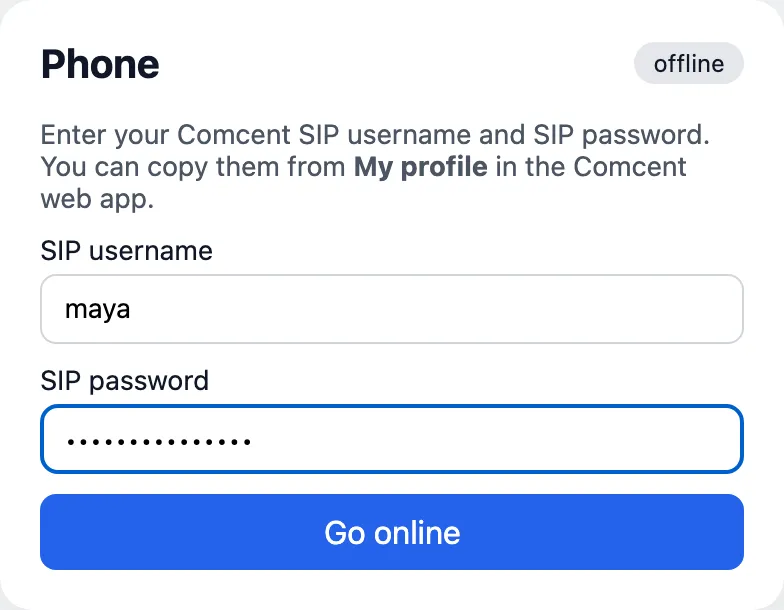
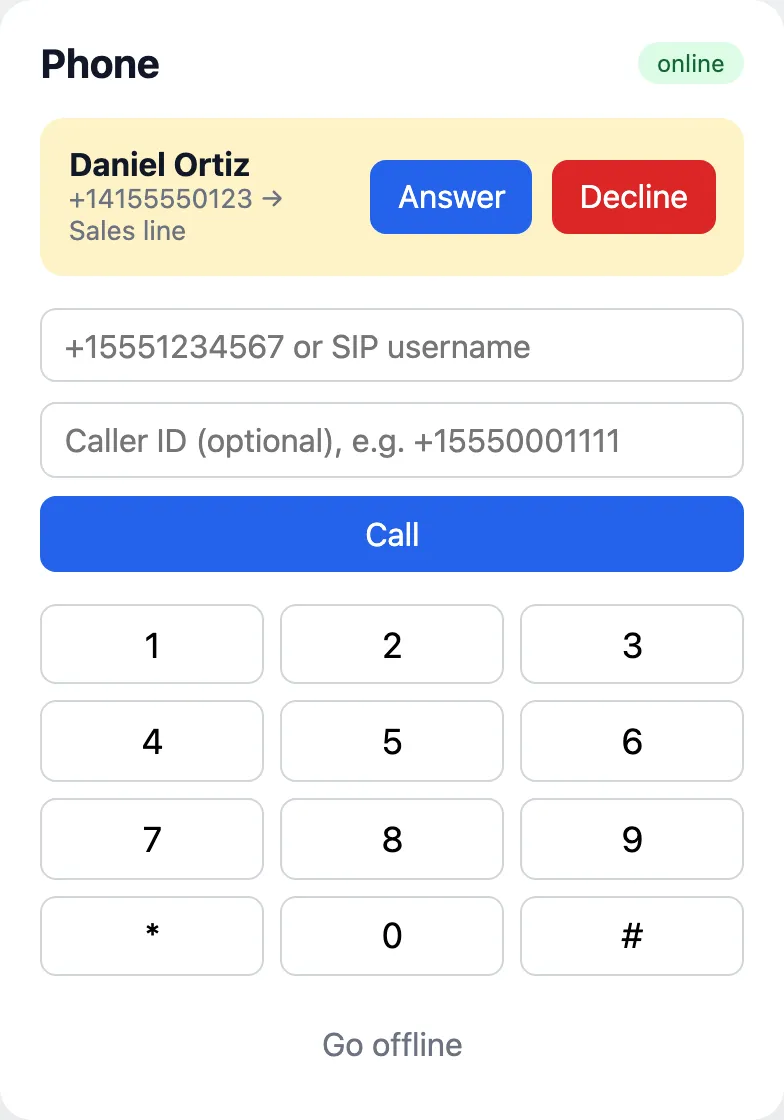
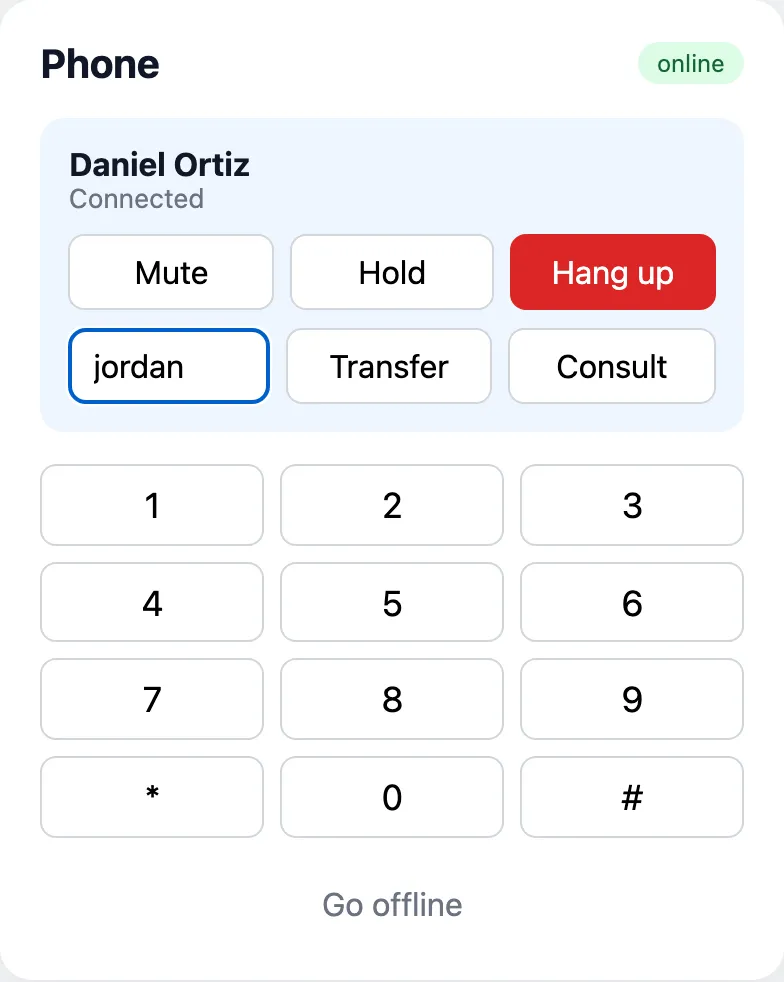
-
Create a SvelteKit app and add SIP.js:
Terminal window npx sv create comcent-phone --template minimal --types tscd comcent-phonenpm install sip.js@0.21.2 -
Add your connection values to
.env:.env # Comcent Cloud. On a self-hosted instance use wss://<COMCENT_DOMAIN>:5063/sip-ws# and <subdomain>.<COMCENT_DOMAIN>.COMCENT_WSS_URL=wss://sip-ws.comcent.ioCOMCENT_SIP_DOMAIN=acme.sip.comcent.io -
Add the four files below.
-
Run
npm run dev, open the page, and sign in with an agent’s SIP username and SIP password.
src/env.ts declares the two values for the browser:
import { defineEnvVars } from '@sveltejs/kit/env';
export const variables = defineEnvVars({  COMCENT_WSS_URL: {    public: true,    static: true,    description: 'Comcent SIP WebSocket, e.g. wss://sip-ws.comcent.io'  },  COMCENT_SIP_DOMAIN: {    public: true,    static: true,    description: 'Your organisation SIP domain, e.g. acme.sip.comcent.io'  }});
src/lib/phone.svelte.ts wraps SIP.js’s SessionManager in a class with Svelte state, so the page re-renders when a call rings, connects or ends:
import { Invitation, UserAgent, Web, type Session } from 'sip.js';import { COMCENT_SIP_DOMAIN, COMCENT_WSS_URL } from '$app/env/public';
export type PhoneStatus = 'offline' | 'connecting' | 'online';
/** `sip:<user>@<subdomain>.sip.comcent.io` for a phone number (E.164) or a member's SIP username. */const target = (to: string) => `sip:${to.trim()}@${COMCENT_SIP_DOMAIN}`;
/** * One agent's browser phone. Holds the agent's SIP credentials in memory only: * the agent types them in, and they are gone when the tab closes. */export class Phone {  status = $state<PhoneStatus>('offline');  error = $state('');
  /** A call ringing in, waiting for Answer or Decline. */  incoming = $state.raw<Invitation | null>(null);  /** The call the agent is talking on (or dialling). */  call = $state.raw<Session | null>(null);  /** The customer, on hold while the agent consults a colleague (attended transfer). */  waiting = $state.raw<Session | null>(null);
  connected = $state(false);  muted = $state(false);  held = $state(false);
  #manager: Web.SessionManager | null = null;  #transferring = false;
  async signIn(username: string, password: string, remoteAudio: HTMLAudioElement) {    this.error = '';    this.status = 'connecting';    const aor = target(username);
    const manager = new Web.SessionManager(COMCENT_WSS_URL, {      aor,      media: {        constraints: { audio: true, video: false },        remote: { audio: remoteAudio }      },      userAgentOptions: {        uri: UserAgent.makeURI(aor),        authorizationUsername: username.trim(),        authorizationPassword: password,        transportOptions: { server: COMCENT_WSS_URL, keepAliveInterval: 25 },        sessionDescriptionHandlerFactoryOptions: {          iceGatheringTimeout: 1000,          peerConnectionConfiguration: {            iceServers: [{ urls: 'stun:stun.l.google.com:19302' }]          }        }      },      registererOptions: { refreshFrequency: 85 },      reconnectionAttempts: 10,      delegate: {        onRegistered: () => (this.status = 'online'),        onServerDisconnect: () => (this.status = 'connecting'),        onCallReceived: (session) => {          if (session instanceof Invitation) this.incoming = session;        },        onCallAnswered: (session) => {          if (session === this.call) this.connected = true;        },        onCallHold: (session, held) => {          if (session === this.call) this.held = held;        },        onCallHangup: (session) => this.#ended(session)      }    });    this.#manager = manager;
    try {      await manager.connect();      await manager.register({        requestDelegate: {          onReject: ({ message }) => {            // 401: wrong username or password. 403: wrong SIP domain.            this.error = `Sign-in refused: ${message.statusCode} ${message.reasonPhrase}`;            this.signOut();          }        }      });    } catch {      this.error = 'Could not reach Comcent. Check your network and try again.';      this.signOut();    }  }
  async signOut() {    const manager = this.#manager;    this.#manager = null;    this.status = 'offline';    if (!manager) return;    await manager.unregister().catch(() => {});    await manager.disconnect();  }
  /** Dial a phone number in E.164, or a colleague by SIP username. */  async dial(to: string, callerId = '') {    if (!this.#manager || !to.trim()) return;    this.#start(      await this.#manager.call(        target(to),        // Optional: which of your Comcent numbers the customer sees.        callerId ? { extraHeaders: [`X-outbound-number: ${callerId}`] } : {},        { requestDelegate: { onReject: ({ message }) => (this.error = `Call failed: ${message.statusCode} ${message.reasonPhrase}`) } }      )    );  }
  async answer() {    const session = this.incoming;    if (!this.#manager || !session) return;    this.incoming = null;    this.#start(session);    await this.#manager.answer(session); // puts any other call on hold first  }
  async decline() {    if (this.#manager && this.incoming) await this.#manager.decline(this.incoming);    this.incoming = null;  }
  async hangup() {    if (this.#manager && this.call) await this.#manager.hangup(this.call);  }
  toggleMute() {    if (!this.#manager || !this.call) return;    if (this.muted) this.#manager.unmute(this.call);    else this.#manager.mute(this.call);    this.muted = !this.muted;  }
  async toggleHold() {    if (!this.#manager || !this.call) return;    if (this.held) await this.#manager.unhold(this.call);    else await this.#manager.hold(this.call);  }
  async sendDigit(digit: string) {    if (this.#manager && this.call) await this.#manager.sendDTMF(this.call, digit);  }
  /** Blind transfer to a colleague (SIP username). You leave the call when it is accepted. */  async transfer(to: string) {    if (this.#manager && this.call && to.trim()) await this.#manager.transfer(this.call, target(to));  }
  /** Attended transfer, step 1: hold the customer and call the colleague. */  async consult(to: string) {    if (!this.#manager || !this.call || !to.trim()) return;    await this.#manager.hold(this.call);    this.waiting = this.call;    this.#start(await this.#manager.call(target(to)));  }
  /** Attended transfer, step 2: connect the customer to the colleague. */  async completeTransfer() {    if (!this.#manager || !this.waiting || !this.call) return;    this.#transferring = true;    await this.#manager.transfer(this.waiting, this.call);  }
  /** Attended transfer, cancelled: end the consultation and go back to the customer. */  async cancelConsult() {    if (this.#manager && this.call) await this.#manager.hangup(this.call);  }
  #start(session: Session) {    this.call = session;    this.connected = false;    this.muted = false;    this.held = false;  }
  #ended(session: Session) {    if (session === this.incoming) this.incoming = null;    if (session === this.waiting) this.waiting = null;    if (session === this.call) {      this.call = null;      const customer = this.waiting;      if (customer && !this.#transferring) {        // The consultation ended without a transfer: take the customer off hold.        this.waiting = null;        this.#start(customer);        this.connected = true;        this.#manager?.unhold(customer);      }    }    if (!this.call && !this.waiting) this.#transferring = false;  }}
src/routes/+page.ts turns off server-side rendering for the page, because SIP.js and WebRTC only run in the browser:
// SIP.js and WebRTC only run in the browser.export const ssr = false;src/routes/+page.svelte is the UI:
<script lang="ts">  import { Phone } from '#lib/phone.svelte.ts';
  const phone = new Phone();
  let remoteAudio: HTMLAudioElement;  let username = $state('');  let password = $state('');  let number = $state('');  let callerId = $state('');  let colleague = $state('');
  const digits = ['1', '2', '3', '4', '5', '6', '7', '8', '9', '*', '0', '#'];
  async function signIn(event: SubmitEvent) {    event.preventDefault();    await phone.signIn(username, password, remoteAudio);    password = ''; // keep it in the SIP.js user agent only  }
  function dial(event: SubmitEvent) {    event.preventDefault();    phone.dial(number, callerId);  }
  function press(digit: string) {    if (phone.call) phone.sendDigit(digit);    else number += digit;  }
  const caller = $derived(phone.incoming?.remoteIdentity);  // "X-Inbound-Info: :<dialled number>:<number name>"  const dialled = $derived(phone.incoming?.request.getHeader('X-Inbound-Info')?.split(':')[2]);</script>
<audio bind:this={remoteAudio} autoplay></audio>
<main>  <header>    <h1>Phone</h1>    <span class="status {phone.status}">{phone.status}</span>  </header>
  {#if phone.error}    <p class="error">{phone.error}</p>  {/if}
  {#if phone.status === 'offline'}    <form onsubmit={signIn}>      <p class="hint">        Enter your Comcent SIP username and SIP password. You can copy them from        <strong>My profile</strong> in the Comcent web app.      </p>      <label>SIP username <input bind:value={username} autocomplete="username" required /></label>      <label>        SIP password        <input type="password" bind:value={password} autocomplete="current-password" required />      </label>      <button class="primary">Go online</button>    </form>  {:else}    {#if phone.incoming}      <section class="ringing">        <div>          <strong>{caller?.displayName || caller?.uri.user}</strong>          <small>{caller?.uri.user}{dialled ? ` → ${dialled}` : ''}</small>        </div>        <button class="primary" onclick={() => phone.answer()}>Answer</button>        <button class="danger" onclick={() => phone.decline()}>Decline</button>      </section>    {/if}
    {#if phone.call}      <section class="call">        <div>          <strong>{phone.call.remoteIdentity.displayName || phone.call.remoteIdentity.uri.user}</strong>          <small>            {#if !phone.connected}Calling…{:else if phone.held}On hold{:else}Connected{/if}            {#if phone.waiting}· customer waiting{/if}          </small>        </div>        <div class="row">          <button class:active={phone.muted} onclick={() => phone.toggleMute()}>            {phone.muted ? 'Unmute' : 'Mute'}          </button>          <button class:active={phone.held} onclick={() => phone.toggleHold()}>            {phone.held ? 'Resume' : 'Hold'}          </button>          <button class="danger" onclick={() => phone.hangup()}>Hang up</button>        </div>
        {#if phone.waiting}          <div class="row">            <button class="primary" onclick={() => phone.completeTransfer()}>Complete transfer</button>            <button onclick={() => phone.cancelConsult()}>Back to customer</button>          </div>        {:else if phone.connected}          <div class="row">            <input bind:value={colleague} placeholder="Colleague's SIP username" />            <button onclick={() => phone.transfer(colleague)}>Transfer</button>            <button onclick={() => phone.consult(colleague)}>Consult</button>          </div>        {/if}      </section>    {:else}      <form onsubmit={dial}>        <input bind:value={number} placeholder="+15551234567 or SIP username" />        <input bind:value={callerId} placeholder="Caller ID (optional), e.g. +15550001111" />        <button class="primary">Call</button>      </form>    {/if}
    <div class="keypad">      {#each digits as digit (digit)}        <button onclick={() => press(digit)}>{digit}</button>      {/each}    </div>
    <button class="link" onclick={() => phone.signOut()}>Go offline</button>  {/if}</main>
<style>  :global(body) {    margin: 0;    font-family: system-ui, sans-serif;    background: #f3f4f6;    color: #111827;  }  main {    max-width: 22rem;    margin: 2rem auto;    padding: 1.25rem;    background: white;    border-radius: 1rem;    box-shadow: 0 4px 24px rgb(0 0 0 / 0.08);    display: grid;    grid-template-columns: minmax(0, 1fr);    gap: 1rem;  }  header {    display: flex;    align-items: center;    justify-content: space-between;  }  h1 {    margin: 0;    font-size: 1.25rem;  }  .status {    font-size: 0.75rem;    padding: 0.2rem 0.6rem;    border-radius: 999px;    background: #e5e7eb;  }  .status.online {    background: #dcfce7;    color: #166534;  }  .status.connecting {    background: #fef9c3;    color: #854d0e;  }  form,  section {    display: grid;    grid-template-columns: minmax(0, 1fr);    gap: 0.6rem;  }  label {    display: grid;    gap: 0.25rem;    font-size: 0.85rem;  }  input {    padding: 0.55rem 0.7rem;    border: 1px solid #d1d5db;    border-radius: 0.5rem;    font: inherit;    min-width: 0;  }  button {    padding: 0.55rem 0.8rem;    border: 1px solid #d1d5db;    border-radius: 0.5rem;    background: white;    font: inherit;    cursor: pointer;  }  button.primary {    background: #2563eb;    border-color: #2563eb;    color: white;  }  button.danger {    background: #dc2626;    border-color: #dc2626;    color: white;  }  button.active {    background: #e0e7ff;  }  button.link {    border: none;    color: #6b7280;    justify-self: center;  }  .row {    display: flex;    gap: 0.5rem;  }  .row > * {    flex: 1 1 0;    min-width: 0;  }  .ringing,  .call {    padding: 0.9rem;    border-radius: 0.75rem;    background: #eff6ff;  }  .ringing {    background: #fef3c7;    grid-template-columns: 1fr auto auto;    align-items: center;  }  small {    display: block;    color: #6b7280;  }  .keypad {    display: grid;    grid-template-columns: repeat(3, 1fr);    gap: 0.5rem;  }  .keypad button {    font-size: 1.1rem;  }  .hint {    margin: 0;    font-size: 0.85rem;    color: #4b5563;  }  .error {    margin: 0;    padding: 0.6rem 0.8rem;    border-radius: 0.5rem;    background: #fee2e2;    color: #991b1b;    font-size: 0.85rem;  }</style>
Using JsSIP instead
Section titled “Using JsSIP instead”The same settings apply. What changes:
| SIP.js | JsSIP 3.x |
|---|---|
new Web.SessionManager(WSS_URL, { userAgentOptions }) | new JsSIP.UA({ sockets: [new JsSIP.WebSocketInterface(WSS_URL)], uri, password, authorization_user, display_name }), then ua.start() |
register() and registererOptions | register: true and register_expires: 600 in the UA config |
delegate.onCallReceived | ua.on("newRTCSession", (e) => { if (e.originator === "remote") … }) |
phone.call(uri, { extraHeaders }) | ua.call(uri, { extraHeaders, mediaConstraints: { audio: true }, pcConfig: { iceServers } }) |
media.remote.audio | Attach yourself: session.connection.addEventListener("track", (e) => audio.srcObject = e.streams[0]) |
answer, hangup, mute, hold | session.answer({ mediaConstraints, pcConfig }), session.terminate(), session.mute(), session.hold() |
sendDTMF(call, "1") | session.sendDTMF("1", { transportType: "INFO" }) |
transfer(call, uri) / transfer(held, consult) | session.refer(uri) / held.refer(consult.remote_identity.uri, { replaces: consult }) |